
noxzbox is a minimalist dynamic window manager for X11 that manages application windows in tiled and floating layouts. Unlike traditional window managers, noxzbox does not provide built-in keybindings, a status bar, or system tray. Instead, it is designed to be controlled entirely through external programs via a FIFO interface, allowing complete customization of the user interface and interaction methods.
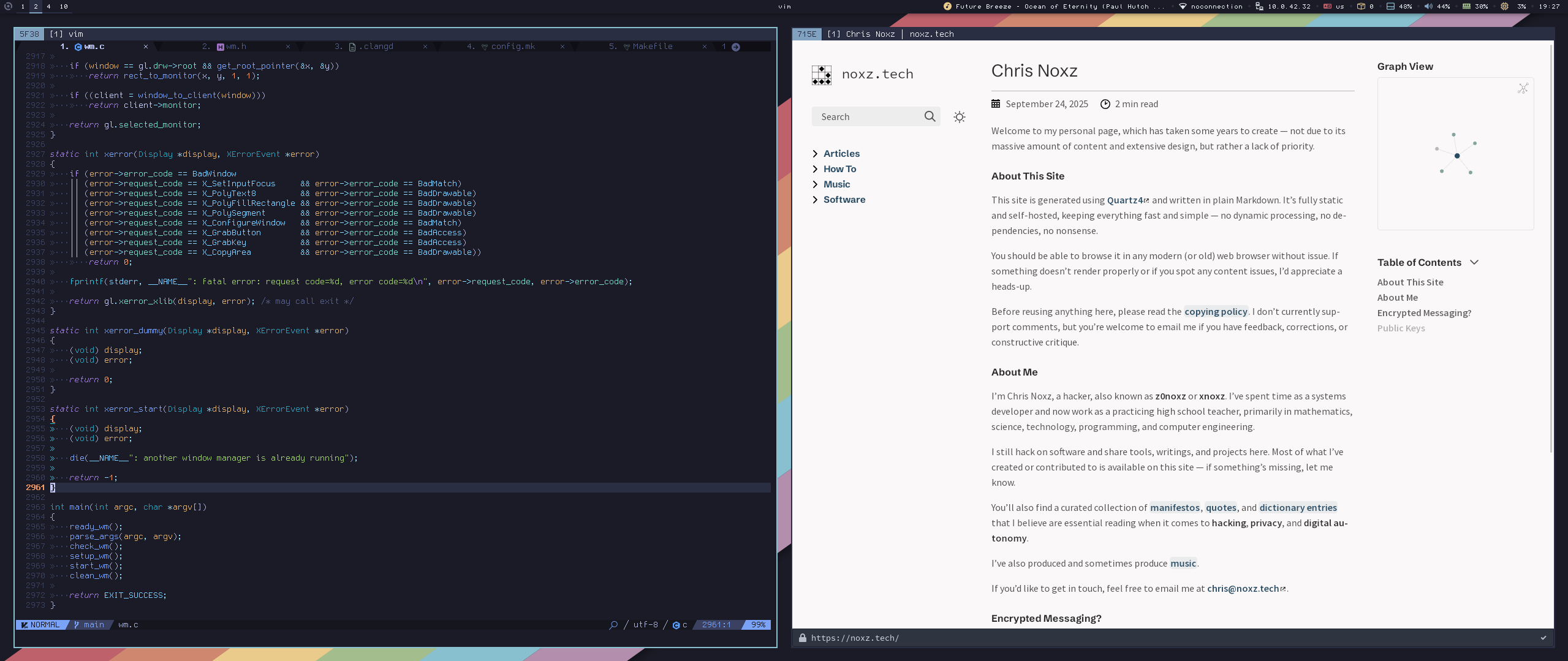
noxzbox running with grid layout, together with a polybar
Download
- noxzbox 1.1 (2026-02-28)
- noxzbox 1.0 (2025-10-10)
Why noxzbox?
noxzbox takes a different approach to window management by separating the window manager from user interaction. Traditional window managers like i3, or dwm have keybindings, status bars, and control mechanisms built directly into the window manager itself. This tight coupling means customization often requires recompiling or working within the constraints of the window manager’s configuration system.
By using a FIFO-based control interface, noxzbox delegates all interaction to external programs. This means:
- True separation of concerns - The window manager manages windows, nothing more (except for direct mouse actions on clients)
- Use any input method - Keyboard daemons, mouse gestures, voice commands, network triggers
- Dynamic reconfiguration - Change behavior without restarting or recompiling
- Language agnostic - Control via shell scripts, Python, or any language that can write to a file
- Minimal core - Smaller hackable codebase, fewer potential bugs, easier to audit and maintain
- State persistence - Window and tag states survive restarts, maintaining your workspace layout
- Flexible n-row grid layout - Unlike fixed master-stack layouts,
noxzboxdistributes windows across configurable rows with adjustable main client factor and column position, adapting to your workflow rather than forcing a predetermined pattern
If you value Unix philosophy, scriptability, and complete control over your environment, noxzbox provides maximum flexibility with minimal assumptions about how you want to interact with your system.
Features
- FIFO-based control interface - No built-in keybindings; controlled entirely via external programs
- N-row grid layout - Flexible tiling with configurable rows, main client factor, main client column position, and gap sizes
- Multi-monitor support - Full Xinerama support for multiple displays
- Floating and tiled modes - Per-window floating state with automatic and runtime rules
- Split border widths - Independent border width configuration for tiled and floating windows
- 10 tags (workspaces) - Implemented as bitmasks for flexible window organization
- Sticky windows - Windows visible across all tags
- Runtime window rules - Add, remove, or clear window rules on the fly via the FIFO without restarting
- EWMH compliance - Works with standard dock windows, status bars, and EWMH strut-based dock positioning
- Splash window support - Borderless, non-movable, automatically floating splash screens
Use Cases
This section shows common layout patterns and workflows you can set up using noxzbox’s FIFO commands. All examples assume the FIFO is at /tmp/noxzbox.fifo.
Even grid of terminals
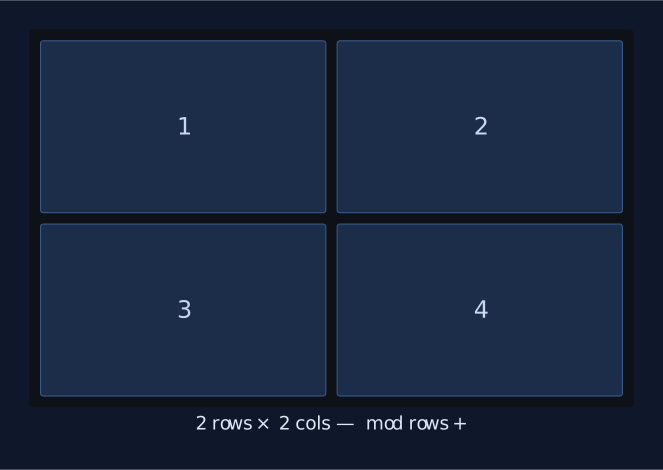
Open four terminals and arrange them in a 2×2 grid. By default noxzbox places everything in a single row, so bump the row count up:
# Open four terminals (adjust the command to your terminal emulator)
for i in 1 2 3 4; do echo "spawn alacritty" > /tmp/noxzbox.fifo; done

# Set to 2 rows → noxzbox automatically distributes 4 windows as 2×2
echo "mod rows +" > /tmp/noxzbox.fifo
Add some breathing room between cells:
echo "mod gaps +" > /tmp/noxzbox.fifo # repeat to tasteTo go back to a single row of side-by-side terminals, decrease rows again:
echo "mod rows -" > /tmp/noxzbox.fifoRow of three windows with a larger centre
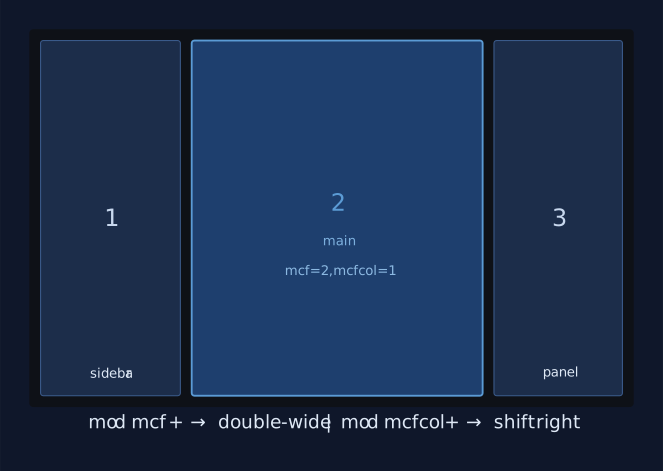
A common editing layout: a narrow sidebar on the left, a wide main area in the middle, and a narrow panel on the right. With three windows open on the same tag:
# 1. Force a single row (default) so all three sit side by side
#    (mod rows - until rows = 1, or it may already be 1)

# 2. Make the main cell span 2 columns worth of space
echo "mod mcf +" > /tmp/noxzbox.fifo   # mcf is now 2

# 3. Shift the large cell one position to the right so it lands in the middle
echo "mod mcfcol +" > /tmp/noxzbox.fifo
Result: window 1 (left, normal width) → window 2 (centre, double width) → window 3 (right, normal width).
To undo and return to equal widths:
echo "mod mcfcol -" > /tmp/noxzbox.fifo
echo "mod mcf -" > /tmp/noxzbox.fifo
Floating scratchpad terminal via runtime rule
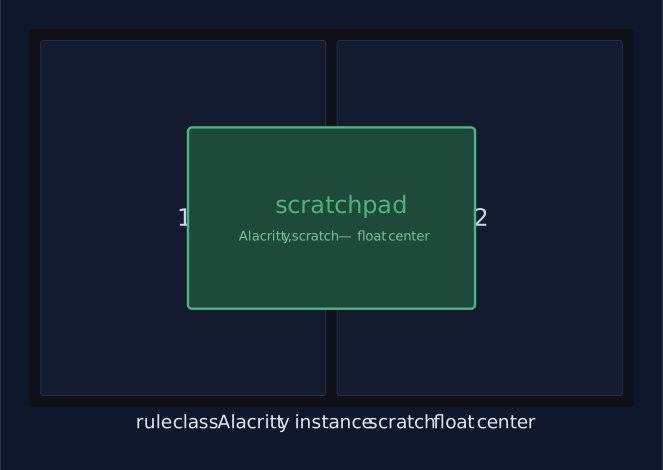
Create a rule that makes any terminal with the instance name scratch open as a centred floating window, regardless of when it is launched:
echo "rule class Alacritty instance scratch float center" > /tmp/noxzbox.fifo

# Then launch it with the right WM_NAME/instance:
echo "spawn alacritty --class Alacritty,scratch" > /tmp/noxzbox.fifo
The window appears centred and floating every time. To remove the rule later:
echo "rule remove class Alacritty instance scratch" > /tmp/noxzbox.fifoSwapping two windows in the grid
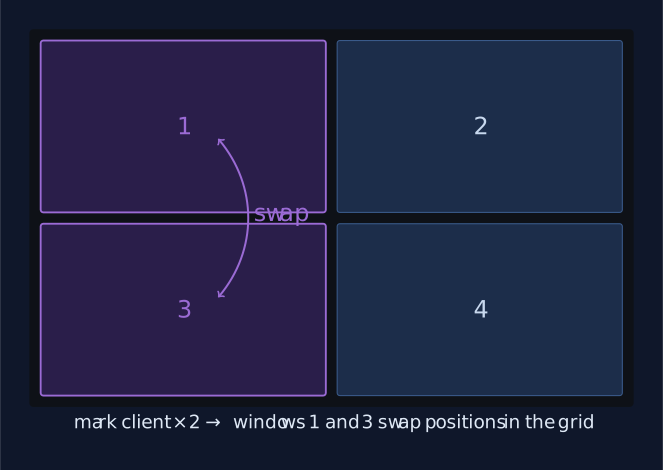
Focus the first window, mark it, then focus the second and mark that too --- noxzbox swaps them:
# Focus window A, mark it
echo "mark client" > /tmp/noxzbox.fifo

# Focus window B (via focus col/row or mouse), then mark to swap
echo "mark client" > /tmp/noxzbox.fifo
Useful for promoting any tiled window to a more prominent cell without disrupting the rest of the layout.
Dependencies
Build time
- C compiler (
gccorclang) makeX11headersXftheadersXineramaheaders (optional, but recommended for multi-monitor support)
Runtime
X11XftXinerama(optional, for multi-monitor support)
Recommended
- Hotkey daemon (e.g.,
sxhkd,xbindkeys) for keyboard control - Status bar (e.g.,
polybar,lemonbar,dzen2) for workspace/window information - Mod key checker
modcheckfor mod key aware bar scripts
Manual
NOXZBOX(1)                  General Commands Manual                 NOXZBOX(1)

NAME
       noxzbox - minimalist dynamic window manager for X11

SYNOPSIS
       noxzbox [-bwt width] [-bwf width] [-nb color] [-ub color] [-sb color]
               [-sf color] [-mb color] [-fifo path]

DESCRIPTION
       noxzbox is a minimalist dynamic window manager for X11 that manages
       application windows in tiled and floating layouts.  Unlike traditional
       window managers, noxzbox does not provide built-in keybindings, a
       status bar, or system tray.  Instead, it is designed to be controlled
       entirely through external programs via a FIFO interface, allowing
       complete customization of the user interface and interaction methods.

       noxzbox supports multiple monitors via Xinerama, multiple tags
       (workspaces), and various window management features including floating
       windows, fullscreen mode, sticky windows, a flexible n-row grid layout
       system, and runtime window rules.

OPTIONS
       -bwt width
              Set tiled border width in pixels (minimum 1).  Default: 2

       -bwf width
              Set floating border width in pixels (minimum 1).  Default: 1

       -nb color
              Set normal border color.  Default: #444444

       -ub color
              Set urgent border color.  Default: #ff0000

       -sb color
              Set selected (tiled) border color.  Default: #005577

       -sf color
              Set selected floating border color.  Default: #006699

       -mb color
              Set marked border color.  Default: #ffff00

       -fifo path
              Set FIFO path for command interface.
              Default: /tmp/noxzbox.fifo

FIFO INTERFACE
       noxzbox is controlled by writing commands to a FIFO located by default
       at /tmp/noxzbox.fifo.  This design allows complete separation of the
       window manager from input handling and status display, enabling
       integration with any external program.

   COMMANDS
       The following commands can be sent to the FIFO:

       view N Switch to tag N (0-9, where 0 is tag 10).

       view   View all tags.

       toggle view N
              Toggle visibility of tag N.

       tag N  Move focused window to tag N.

       toggle tag N
              Toggle focused window on tag N.

       toggle layout
              Toggle between grid and fullscreen layout.

       toggle floating
              Toggle floating state of focused window.

       toggle sticky
              Toggle sticky state (visible on all tags) of focused window.

       toggle gaps
              Toggle visibility of gaps in grid layout.

       cycle floating +|-
              Cycle focus through floating windows.

       cycle stack +|-
              Cycle focus through tiled windows.

       focus col +|-
              Focus window in adjacent column (grid layout).

       focus row +|-
              Focus window in adjacent row (grid layout).

       move col +|-
              Move focused window to adjacent column (grid layout).

       move row +|-
              Move focused window to adjacent row (grid layout).

       focus mon +|-
              Focus next/previous monitor.

       tag mon +|-
              Move focused window to next/previous monitor.

       mod gaps +|-
              Increase/decrease gap size.

       mod mcf +|-
              Modify main client factor (affects first window size in grid).
              Minimum value is 1.

       mod mcfcol +|-
              Shift the main client column position in the grid layout.
              Moves the large main cell left or right within the first row.
              Clamped against the real column count so the main cell always
              stays in bounds.

       mod rows +|-
              Increase/decrease number of rows in grid layout.

       center client
              Center the focused floating window.

       kill client
              Close the focused window.

       mark client
              Mark a window for swapping (grid layout only).  Mark a second
              window to swap positions.

       move top
              Move focused window to top of stack.

       close dock
              Close the dock window if present.

       rule [options...]
              Add a window rule that applies to future windows.  See WINDOW
              RULES for details.

       rule clear
              Remove all window rules.

       rule remove [options...]
              Remove specific window rule(s).

       spawn command args...
              Execute a command with arguments.

       quit   Exit the window manager.

INTEGRATION
   KEYBINDINGS
       noxzbox does not handle keyboard input directly.  Use an external
       hotkey daemon to bind keys to FIFO commands.

       Example using a hotkey daemon:

           # Toggle floating
           super + shift + space
               echo toggle floating > /tmp/noxzbox.fifo

           # Switch to tag 1
           super + 1
               echo view 0 > /tmp/noxzbox.fifo

           # Spawn terminal
           super + Return
               echo spawn alacritty > /tmp/noxzbox.fifo

   STATUS BAR
       noxzbox supports any EWMH-compliant dock window.

       noxzbox sets the following X properties for status bar integration:

       _NET_ACTIVE_WINDOW
              Currently focused window.

       _NET_CLIENT_LIST
              List of all managed windows.

       _NET_CLIENT_LIST_STACKING
              Windows in stacking order.

       _NET_CURRENT_DESKTOP
              Currently active tag.

       _NET_NUMBER_OF_DESKTOPS
              Total number of tags (always 10).

       NOXZBOX_TAG_STATE
              Bitmask of visible tags (bits 0-9).

       NOXZBOX_TAG
              Current tag number (1-10).

       NOXZBOX_CLIENT_INFO
              Per-window property containing a 2-element array: tags bitmask
              and monitor number.

       _NOXZBOX_FLOATING
              Per-window property set when the window is in floating state.
              Useful for compositor rules that need to distinguish floating
              from tiled windows.

       Monitor the FIFO for changes to trigger status bar updates:

           inotifywait -e modify,open /tmp/noxzbox.fifo

       Example script to read tag state:

           #!/bin/sh
           get_x11_property() {
               xprop -root "$1" | grep -o '[0-9]\+$'
           }

           is_bit_set() {
               [ $(($1 & (1 << $2))) -ne 0 ]
           }

           # Get active tags bitmask
           active=$(get_x11_property "NOXZBOX_TAG_STATE")

           # Check if tag 0 is active
           if is_bit_set "$active" 0; then
               echo "Tag 1 is active"
           fi

       To get occupied tags, iterate through _NET_CLIENT_LIST and read each
       window's NOXZBOX_CLIENT_INFO property:

           #!/bin/sh
           occupied=0
           clients=$(xprop -root _NET_CLIENT_LIST | grep -o '0x[0-9a-fA-F]\+')

           for client in $clients; do
               info=$(xprop -id "$client" NOXZBOX_CLIENT_INFO \
                      | grep -o '[0-9]\+' | head -1)
               occupied=$((occupied | info))
           done

           echo "Occupied tags bitmask: $occupied"

LAYOUTS
       noxzbox provides two built-in layouts:

       Grid Layout
              Windows are arranged in an n-row grid.  The main client factor
              (mcf) controls how many rows and columns the first window spans.
              When mcf is greater than 1, the main cell occupies multiple rows
              and columns.  The horizontal position of the main cell within
              the first row can be shifted using mod mcfcol.  Gaps can be
              toggled and adjusted.

       Fullscreen Layout
              Each window occupies the entire screen.  Use cycling commands to
              switch between windows.

MOUSE BINDINGS
       noxzbox provides three default mouse bindings when used with Mod4
       (Super):

       Mod4 + Button1 (left click)
              Move floating window.  Auto-floats tiled windows when moved
              beyond snap threshold.

       Mod4 + Button3 (right click)
              Resize floating window from nearest corner.  Auto-floats tiled
              windows when resized beyond snap threshold.

       Mod4 + Button2 (middle click)
              Toggle floating state of window.

TAGS
       noxzbox provides 10 tags (workspaces) numbered 0-9, where tag 0
       represents tag 10.  Tags are implemented as bitmasks, allowing windows
       to be visible on multiple tags simultaneously.

       Each tag maintains independent settings for:

       •  Layout (grid or fullscreen)
       •  Number of rows
       •  Main client factor
       •  Main client column position
       •  Gap size and visibility
       •  Marked client

WINDOW RULES
       noxzbox applies automatic rules to certain window types and supports
       runtime rule configuration via the FIFO interface.

   Automatic Rules
       Dialog windows
              Automatically floated and centered.

       Modal windows
              Automatically floated.

       Transient windows
              Inherit tags from parent window and float.

       Dock windows
              Only one dock is allowed.  Additional docks are automatically
              destroyed.  Docks adjust the workspace area for all other
              windows via EWMH strut properties.

       Splash windows
              Automatically floated, borderless, and non-movable.

       Fixed size windows
              Automatically floated (windows with matching min/max size
              hints).

   Runtime Rules
       Rules can be added, removed, or cleared at runtime via the FIFO.
       Rules are checked when windows are managed; the first matching rule
       is applied.

       rule [class CLASS] [instance INSTANCE] [float] [sticky] [center]
            [tag N] [monitor N]

       class CLASS
              Match windows with WM_CLASS matching CLASS.

       instance INSTANCE
              Match windows with WM_NAME (instance) matching INSTANCE.
              If not specified, any instance matches.

       float  Make matching windows floating.

       sticky Make matching windows sticky (visible on all tags).

       center Center matching windows (only effective for floating windows).

       tag N  Place matching windows on tag N (0-9).

       monitor N
              Place matching windows on monitor N.

       Examples:

           echo "rule class mpv float center" > /tmp/noxzbox.fifo
           echo "rule class firefox tag 0" > /tmp/noxzbox.fifo
           echo "rule remove class mpv" > /tmp/noxzbox.fifo
           echo "rule clear" > /tmp/noxzbox.fifo

       Notes:
       •  Rules are applied in the order they were added.
       •  Only the first matching rule is applied to each window.
       •  Rules are not persisted across restarts.
       •  Rules only affect newly managed windows, not existing ones.
       •  Class and instance names are case-sensitive.

ENVIRONMENT
       DISPLAY
              X11 display to connect to.

FILES
       /tmp/noxzbox.fifo
              Default command interface FIFO.  Can be changed with -fifo
              option.

EXAMPLES
   Basic Startup Script
       Create an auto-restarting wrapper:

           #!/bin/sh
           while true; do
               noxzbox -bwt 2 -bwf 1 -nb "#444444" -sb "#005577"
           done

   X Resources Integration
       Read colors from xrdb(1):

           #!/bin/sh
           get_xres() {
               xrdb -query | grep "^$1:" | cut -f2- | tr -d ' \t'
           }

           NB=$(get_xres "noxzbox.normalBorderColor")
           UB=$(get_xres "noxzbox.urgentBorderColor")
           SB=$(get_xres "noxzbox.selectedBorderColor")
           SF=$(get_xres "noxzbox.selectedFloatColor")
           MB=$(get_xres "noxzbox.markedBorderColor")

           noxzbox \
               -nb "${NB:-#444444}" \
               -ub "${UB:-#ff0000}" \
               -sb "${SB:-#005577}" \
               -sf "${SF:-#006699}" \
               -mb "${MB:-#ffff00}"

   Multiple Instances
       Run multiple instances with different FIFO paths:

           # Instance 1 on display :0
           DISPLAY=:0 noxzbox -fifo /tmp/noxzbox-0.fifo &

           # Instance 2 on display :1
           DISPLAY=:1 noxzbox -fifo /tmp/noxzbox-1.fifo &

   Sending Commands
       Send commands to the FIFO:

           # Switch to tag 5
           echo "view 4" > /tmp/noxzbox.fifo

           # Spawn a terminal
           echo "spawn alacritty" > /tmp/noxzbox.fifo

           # Toggle floating for focused window
           echo "toggle floating" > /tmp/noxzbox.fifo

SEE ALSO
       X(7), Xinerama(3), xprop(1)

AUTHOR
       Chris Noxz <chris@noxz.tech>

NOTES
       Only one dock window is supported at a time.  Additional dock windows
       are automatically destroyed.

       The FIFO interface provides no feedback on command success or failure.
       Monitor stderr for rule addition/removal messages.

       Window snapping only works with workspace edges, not with other
       windows.

       Window rules are not persisted across WM restarts and must be
       re-added on each startup.

COPYRIGHT
       Copyright © 2023-2025 Chris Noxz

       This is free software licensed under the GNU GPL version 3 or later.
       See <https://www.gnu.org/licenses/> for details.

                                noxzbox-1.0                         NOXZBOX(1)
Example config for sxhkd
# :restart
super + shift + r
	echo quit > ${WMFIFO}
# :toggle layout (fullscreen/grid)
super + f
	echo toggle layout > ${WMFIFO}
# :toggle floating client
super + shift + space
	echo toggle floating > ${WMFIFO}
# :toggle sticky client
super + s
	echo toggle sticky > ${WMFIFO}
# :toggle gaps
super + g
	echo toggle gaps > ${WMFIFO}
# :move selected client to top of stack
super + space
	echo move top > ${WMFIFO}
# :focus/move row
super + {_,shift} + {j,k}
	echo {focus,move} row {+,-} > ${WMFIFO}
# :focus/move column
super + {_,shift} + {h,l}
	echo {focus,move} col {-,+} > ${WMFIFO}
# :increase/decrease rows
super + {equal,minus}
	echo mod rows {+,-} > ${WMFIFO}
# :increase/decrease mcf
super + shift + {equal,minus}
	echo mod mcf {+,-} > ${WMFIFO}
# :shift main cell column left/right
super + control + {h,l}
	echo mod mcfcol {-,+} > ${WMFIFO}
# :increase/decrease gaps
super + control + {equal,minus}
	echo mod gaps {+,-} > ${WMFIFO}
# :cycle through floating windows
super + Tab
	echo cycle floating + > ${WMFIFO}
# :cycle through layout windows
super + shift + Tab
	echo cycle stack + > ${WMFIFO}
# :change monitor focus
super + {comma,period}
	echo focus mon {+,-} > ${WMFIFO}
# :move client to monitor
super + shift + {comma,period}
	echo tag mon {+,-} > ${WMFIFO}
# :show view
super + {1-9,0}
	echo view {0-8,9} > ${WMFIFO}
# :toggle view
super + control + {1-9,0}
	echo toggle view {0-8,9} > ${WMFIFO}
# :send client to view
super + shift + {1-9,0}
	echo tag {0-8,9} > ${WMFIFO}
# :toggle client on view
super + control + shift + {1-9,0}
	echo toggle tag {0-8,9} > ${WMFIFO}
# :spawn terminal
super + Return
	echo spawn $HOME/.local/bin/tabbed-term > ${WMFIFO}
# :spawn terminal
super + shift + Return
	echo spawn $TERMINAL > ${WMFIFO}
# :move client to center
super + c
	echo center client > ${WMFIFO}
# :mark/move client
super + n
	echo mark client > ${WMFIFO}
Example config for polybar
...
[module/noxzbox-tags]
type = custom/script
exec = ~/.config/polybar/scripts/noxzbox-tags.sh
tail = true
format = <label>
label = %output%
...#!/bin/sh
# Polybar module for noxzbox workspace/tag display
#
# This script monitors the noxzbox state file and generates clickable
# workspace indicators for polybar. It shows:
# - Which tags/workspaces exist (have windows)
# - Which tag is currently focused (highlighted)
# - Allows clicking tags to switch workspaces
#
# The script runs continuously, updating whenever the state file changes.
# Tags are numbered 1-10, with visual indicators for occupied/focused states.
WMFIFO="/tmp/noxzbox.fifo"
WM_NAME="NOXZBOX"
CLICK_SCRIPT="$HOME/.config/polybar/scripts/noxzbox-tag-click.sh"
VACANT_FILE="/tmp/.bar.show_vacant"
get_xresource() {
resource="$1"
default="$2"
value=$(xrdb -query | grep "^${resource}:" | cut -d: -f2 | tr -d '[:space:]')
echo "${value:-$default}"
}
# Colors
COLOR_NORMAL_FG=$(get_xresource "bar.tagsNormalForeground" "#6c7086")
COLOR_NORMAL_BG=$(get_xresource "bar.tagsNormalBackground" "#1e1e2e")
COLOR_NORMAL_BR=$(get_xresource "bar.tagsNormalBorderColor" "#1e1e2e")
COLOR_URGENT_FG=$(get_xresource "bar.tagsUrgentForeground" "#1e1e2e")
COLOR_URGENT_BG=$(get_xresource "bar.tagsUrgentBackground" "#f38ba8")
COLOR_URGENT_BR=$(get_xresource "bar.tagsUrgentBorderColor" "#f38ba8")
COLOR_INCLUDED_FG=$(get_xresource "bar.tagsIncludedForeground" "#f9e2af")
COLOR_INCLUDED_BG=$(get_xresource "bar.tagsIncludedBackground" "#1e1e2e")
COLOR_INCLUDED_BR=$(get_xresource "bar.tagsIncludedBorderColor" "#1e1e2e")
COLOR_SELECTED_FG=$(get_xresource "bar.tagsSelectedForeground" "#89b4fa")
COLOR_SELECTED_BG=$(get_xresource "bar.tagsSelectedBackground" "#1e1e2e")
COLOR_SELECTED_BR=$(get_xresource "bar.tagsSelectedBorderColor" "#1e1e2e")
COLOR_OCCUPIED="#f9e2af"
COLOR_EMPTY="#6c7086"
# Function to check if vacant tags should be shown
should_show_vacant() {
if [ -f "$VACANT_FILE" ]; then
content="$(cat "$VACANT_FILE" 2>/dev/null)"
[ "$content" = "1" ]
else
return 1 # File doesn't exist = don't show vacant
fi
}
# Function to get X11 property as integer
get_x11_property() {
prop="$1"
value=$(xprop -root "$prop" 2>/dev/null | grep -o '[0-9]\+$')
echo "${value:-0}"
}
# Function to get occupied tags from client list
get_occupied_tags() {
occupied=0
retries=3
while [ $retries -gt 0 ]; do
clients=$(xprop -root _NET_CLIENT_LIST 2>/dev/null | grep -o '0x[0-9a-fA-F]\+' || true)
if [ -n "$clients" ]; then
for client in $clients; do
client_info=$(xprop -id "$client" "${WM_NAME}_CLIENT_INFO" 2>/dev/null | grep -o '[0-9]\+' | head -1)
if [ -n "$client_info" ] && [ "$client_info" != "0" ]; then
occupied=$((occupied | client_info))
fi
done
break # Success, exit retry loop
fi
retries=$((retries - 1))
[ $retries -gt 0 ] && sleep 0.2
done
echo "$occupied"
}
# Function to get urgent tags
get_urgent_tags() {
urgent=0
clients=$(xprop -root _NET_CLIENT_LIST 2>/dev/null | grep -o '0x[0-9a-fA-F]\+' || true)
for client in $clients; do
wm_hints=$(xprop -id "$client" WM_HINTS 2>/dev/null | grep -i urgent || true)
if [ -n "$wm_hints" ]; then
client_info=$(xprop -id "$client" "${WM_NAME}_CLIENT_INFO" 2>/dev/null | grep -o '[0-9]\+' | head -1)
if [ -n "$client_info" ] && [ "$client_info" != "0" ]; then
urgent=$((urgent | client_info))
fi
fi
done
echo "$urgent"
}
# Function to check if a bit is set in a bitmask
is_bit_set() {
bitmask=$1
bit_position=$2
bit_value=$((1 << bit_position))
[ $((bitmask & bit_value)) -ne 0 ]
}
# Function to convert display number to WM tag index
get_tag_index() {
display_num="$1"
if [ "$display_num" = "0" ]; then
echo "9" # Tag 0 maps to index 9
else
echo "$((display_num - 1))" # Tags 1-9 map to indices 0-8
fi
}
# Function to get display label for tag
get_display_label() {
tag_display="$1"
if [ "$tag_display" = "0" ]; then
echo "10"
else
echo "$tag_display"
fi
}
# Function to get tag status
get_tag_status() {
tag_display="$1"
display_label=$(get_display_label "$tag_display")
if [ "$tag_display" = "0" ]; then
tag_index=9
else
tag_index=$((tag_display - 1))
fi
active_bitmask=$(get_x11_property "${WM_NAME}_TAG_STATE")
occupied_bitmask=$(get_occupied_tags)
urgent_bitmask=$(get_urgent_tags)
is_active=false
is_occupied=false
is_urgent=false
is_bit_set "$active_bitmask" "$tag_index" && is_active=true
is_bit_set "$occupied_bitmask" "$tag_index" && is_occupied=true
is_bit_set "$urgent_bitmask" "$tag_index" && is_urgent=true
if $is_urgent; then
echo "%{F$COLOR_URGENT_FG}%{B$COLOR_URGENT_BG}%{u$COLOR_URGENT_BR}%{+u} $display_label %{-u}%{B-}%{F-}"
elif $is_active; then
echo "%{F$COLOR_SELECTED_FG}%{B$COLOR_SELECTED_BG}%{u$COLOR_SELECTED_BR}%{+u} $display_label %{-u}%{B-}%{F-}"
elif $is_occupied; then
echo "%{F$COLOR_INCLUDED_FG}%{u$COLOR_INCLUDED_BR}%{+u} $display_label %{-u}%{F-}"
else
echo "%{F$COLOR_NORMAL_FG} $display_label %{F-}"
fi
}
generate_tags() {
output=""
# Get current state
active_bitmask=$(get_x11_property "${WM_NAME}_TAG_STATE")
occupied_bitmask=$(get_occupied_tags)
# Add vacant toggle button
if should_show_vacant; then
vacant_toggle="%{A1:$CLICK_SCRIPT toggle_vacant:}%{F$COLOR_OCCUPIED}%{F-}%{A}"
else
vacant_toggle="%{A1:$CLICK_SCRIPT toggle_vacant:}%{F$COLOR_EMPTY}%{F-}%{A}"
fi
output="$output$vacant_toggle "
# Loop through tags: 1234567890
tag_sequence="1234567890"
i=0
while [ $i -lt ${#tag_sequence} ]; do
# Extract character at position i (POSIX way)
display_num=$(echo "$tag_sequence" | cut -c$((i + 1)))
tag_index=$(get_tag_index "$display_num")
# Check if tag should be shown
is_active=false
is_occupied=false
is_bit_set "$active_bitmask" "$tag_index" && is_active=true
is_bit_set "$occupied_bitmask" "$tag_index" && is_occupied=true
# Show if: showing vacant OR (active OR occupied)
if should_show_vacant || $is_active || $is_occupied; then
tag_status=$(get_tag_status "$display_num")
click_action="%{A1:$CLICK_SCRIPT 1 $tag_index:}"
click_action="$click_action%{A2:$CLICK_SCRIPT 2 $tag_index:}"
click_action="$click_action%{A3:$CLICK_SCRIPT 3 $tag_index:}"
output="$output$click_action$tag_status%{A}%{A}%{A}"
fi
i=$((i + 1))
done
echo "$output"
}
while ! pgrep -x "noxzbox" >/dev/null 2>&1; do
sleep .1
done
generate_tags
while :; do
inotifywait -e modify,open "$WMFIFO" >/dev/null 2>&1
generate_tags
done#!/bin/sh
WMFIFO="/tmp/noxzbox.fifo"
VACANT_FILE="/tmp/.bar.show_vacant"
# Get arguments
ACTION="$1"
TAG_INDEX="$2"
# Handle special actions
if [ "$ACTION" = "toggle_vacant" ]; then
if [ -f "$VACANT_FILE" ]; then
content="$(cat "$VACANT_FILE" 2>/dev/null)"
if [ "$content" = "1" ]; then
echo "0" > "$VACANT_FILE"
else
echo "1" > "$VACANT_FILE"
fi
else
echo "1" > "$VACANT_FILE"
fi
touch "$WMFIFO"
exit 0
fi
# Handle regular tag actions
case "$ACTION" in
1) # Left click
if modcheck super; then
echo "tag $TAG_INDEX" > "$WMFIFO"
else
echo "view $TAG_INDEX" > "$WMFIFO"
fi
;;
2) # Middle click
echo "toggle tag $TAG_INDEX" > "$WMFIFO"
;;
3) # Right click
echo "toggle view $TAG_INDEX" > "$WMFIFO"
;;
esacInstallation
Edit config.mk to match your local setup (noxzbox is installed into the /usr/local namespace by default), then simply enter the following command to install (if necessary as root):
make clean install
get source here.